Today I am also back with a new and Free Android App for you. I sometimes ask people why do they take someone's phone and if they take,what need they have to see someone's personal photos? I know no one is going to answer it. So, here is a solution for it.
Photo Locker - Hide pictures
This App is available free at Google Play Store.
 |
| Photo Locker - Hide pictures Free Download./ Image:Google Play Store |
Key Features are:
1)Encryption - hidden pictures are not only moved to a secret location on your phone but are also encrypted using advanced 128 bit AES encryption. This means that even if someone manage to steal your SD card and copy the hidden picture files, they will still be unable to view the locked photos.
2)User friendly operation - Easily hide photos via default gallery or from within Photo Locker itself.
3)Fast bulk hide - Keep safe hundreds of photos quickly
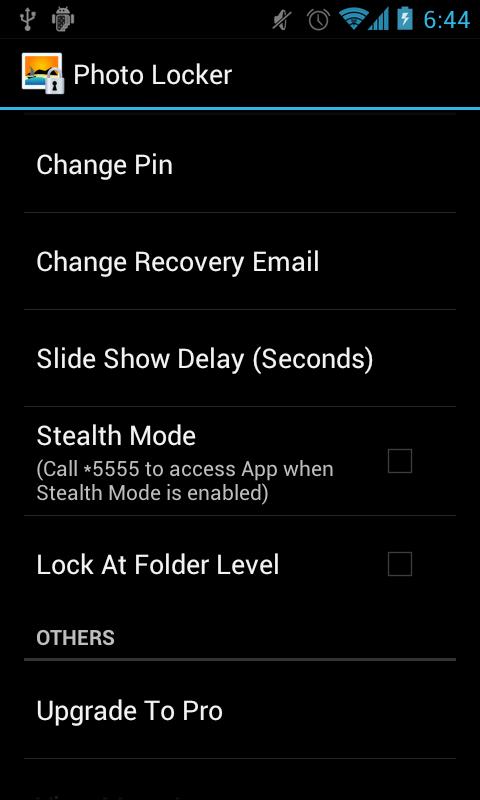
4)Folder level locking - lock individual hidden photo albums. This allows you to show only 1 hidden photo album without exposing the others.
5)Zoom in and out of hidden photos with multi-touch. Hidden photos maintain their original resolution and are not scaled down as in some other photo hiding apps.
6)Rotate hidden pictures left and right
7)Slideshow - Slideshow viewing mode available with customizable delay setting
8)Removed from recent app list - Photo Locker App will not appear in 'recent apps' list
9)Lock on sleep - If you forgot to exit the Photo Locker, the app will lockout as soon as your phone goes to sleep mode.
10)Tablet optimized - Photo Locker's UI has been designed with tablets in mind as well so as to provide the ultimate viewing pleasure on both Android smart phones and tablets
11)PIN recovery - With the optional PIN recovery feature, you won't lose your precious files even if you forgot your PIN code. The app will email the PIN to you in the event you forgot Photo Locker's PIN code.
12)Un-hide pictures easily - Un-hide photos just as easily as hiding them and you can decide where the un-hidden photos go.
2)User friendly operation - Easily hide photos via default gallery or from within Photo Locker itself.
3)Fast bulk hide - Keep safe hundreds of photos quickly
4)Folder level locking - lock individual hidden photo albums. This allows you to show only 1 hidden photo album without exposing the others.
5)Zoom in and out of hidden photos with multi-touch. Hidden photos maintain their original resolution and are not scaled down as in some other photo hiding apps.
6)Rotate hidden pictures left and right
7)Slideshow - Slideshow viewing mode available with customizable delay setting
8)Removed from recent app list - Photo Locker App will not appear in 'recent apps' list
9)Lock on sleep - If you forgot to exit the Photo Locker, the app will lockout as soon as your phone goes to sleep mode.
10)Tablet optimized - Photo Locker's UI has been designed with tablets in mind as well so as to provide the ultimate viewing pleasure on both Android smart phones and tablets
11)PIN recovery - With the optional PIN recovery feature, you won't lose your precious files even if you forgot your PIN code. The app will email the PIN to you in the event you forgot Photo Locker's PIN code.
12)Un-hide pictures easily - Un-hide photos just as easily as hiding them and you can decide where the un-hidden photos go.
 |
| Image: Google Play Store. |
It also has some Premium Features:
1)Stealth Mode - Hide the app itself! Photo Locker App will
disappear from the app drawer as if it never exist on your phone. Access to your private photo vault can only be achieved by dialing the secret PIN code or via an innocent looking calculator widget.
2)Ad-free viewing experience.
disappear from the app drawer as if it never exist on your phone. Access to your private photo vault can only be achieved by dialing the secret PIN code or via an innocent looking calculator widget.
2)Ad-free viewing experience.